📋 Model Description
base_model:
- Qwen/Qwen3-Omni-30B-A3B-Instruct
- en
- fr
- de
- es
- it
- pt
- ru
- gguf
Qwen3-Omni

Overview
Introduction
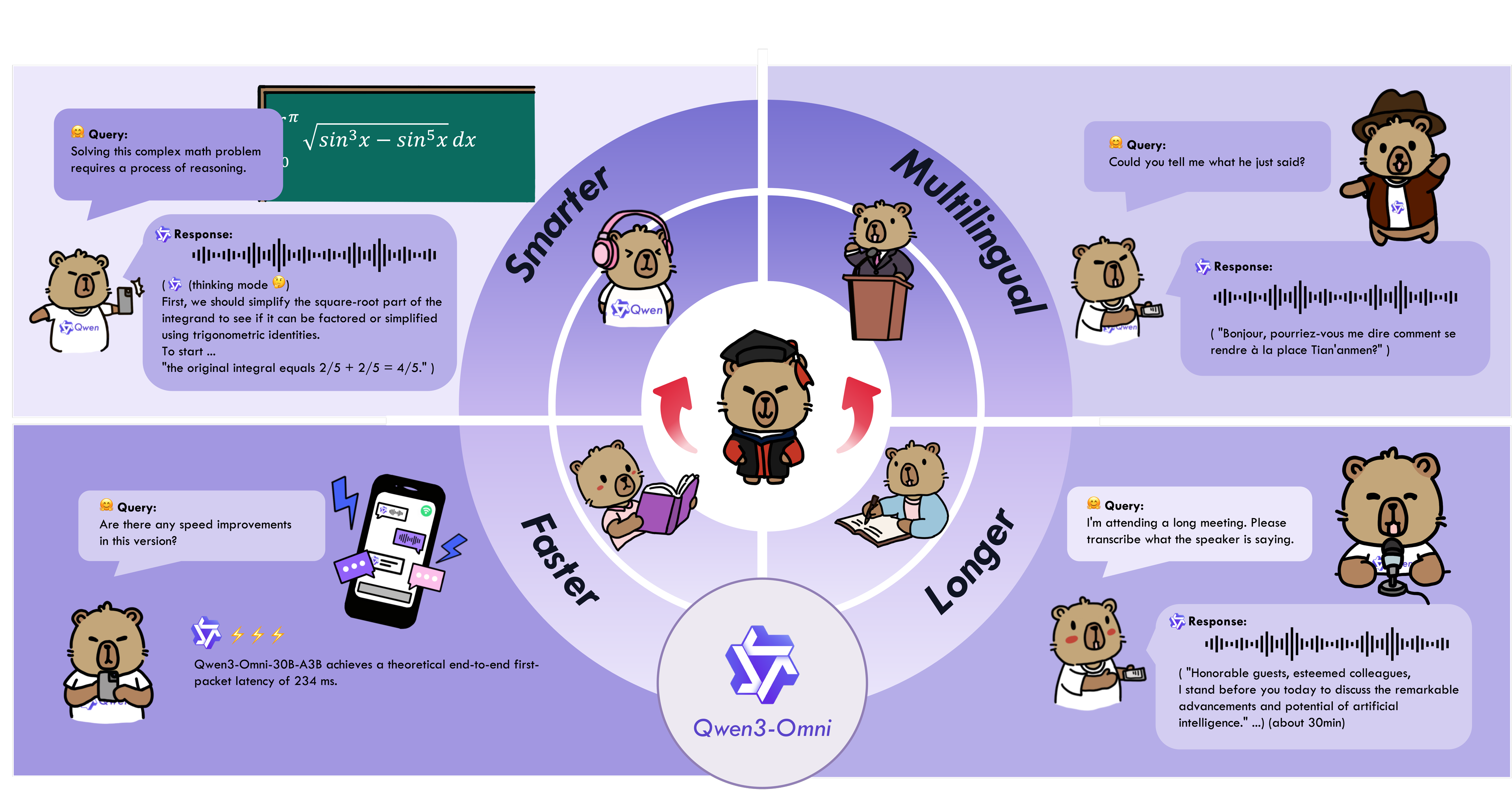
Qwen3-Omni is the natively end-to-end multilingual omni-modal foundation models. It processes text, images, audio, and video, and delivers real-time streaming responses in both text and natural speech. We introduce several architectural upgrades to improve performance and efficiency. Key features:
- State-of-the-art across modalities: Early text-first pretraining and mixed multimodal training provide native multimodal support. While achieving strong audio and audio-video results, unimodal text and image performance does not regress. Reaches SOTA on 22 of 36 audio/video benchmarks and open-source SOTA on 32 of 36; ASR, audio understanding, and voice conversation performance is comparable to Gemini 2.5 Pro.
- Multilingual: Supports 119 text languages, 19 speech input languages, and 10 speech output languages.
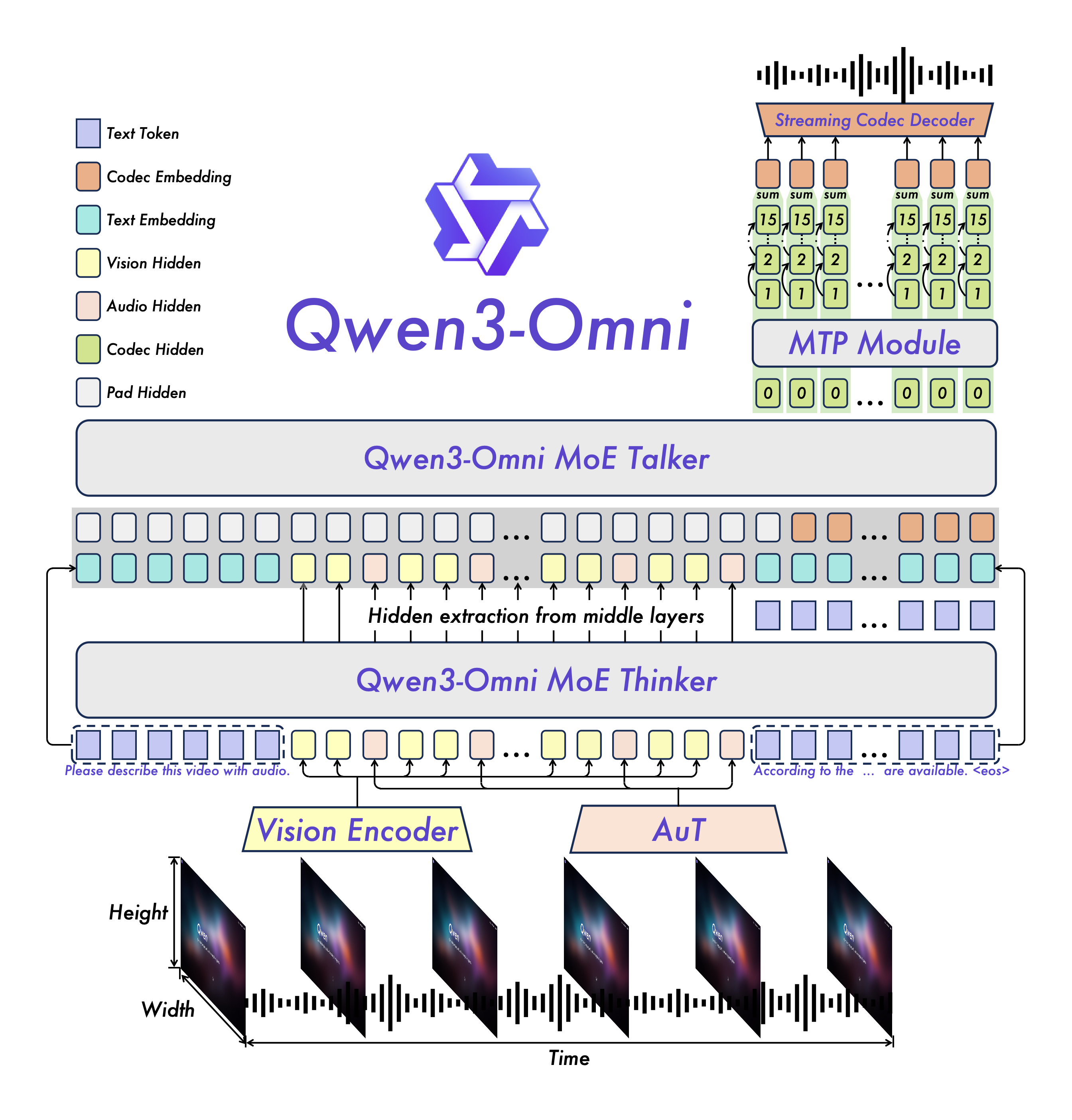
- Novel Architecture: MoE-based Thinker–Talker design with AuT pretraining for strong general representations, plus a multi-codebook design that drives latency to a minimum.
- Real-time Audio/Video Interaction: Low-latency streaming with natural turn-taking and immediate text or speech responses.
- Flexible Control: Customize behavior via system prompts for fine-grained control and easy adaptation.
- Detailed Audio Captioner: Qwen3-Omni-30B-A3B-Captioner is now open source: a general-purpose, highly detailed, low-hallucination audio captioning model that fills a critical gap in the open-source community.
Model Architecture
Cookbooks for Usage Cases
Qwen3-Omni supports a wide range of multimodal application scenarios, covering various domain tasks involving audio, image, video, and audio-visual modalities. Below are several cookbooks demonstrating the usage cases of Qwen3-Omni and these cookbooks include our actual execution logs. You can first follow the QuickStart guide to download the model and install the necessary inference environment dependencies, then run and experiment locally—try modifying prompts or switching model types, and enjoy exploring the capabilities of Qwen3-Omni!
| Category | Cookbook | Description | Open |
|---|---|---|---|
| Audio | Speech Recognition | Speech recognition, supporting multiple languages and long audio. |  |
| Speech Translation | Speech-to-Text / Speech-to-Speech translation. | |
|
| Music Analysis | Detailed analysis and appreciation of any music, including style, genre, rhythm, etc. | |
|
| Sound Analysis | Description and analysis of various sound effects and audio signals. | |
|
| Audio Caption | Audio captioning, detailed description of any audio input. | |
|
| Mixed Audio Analysis | Analysis of mixed audio content, such as speech, music, and environmental sounds. | |
|
| Visual | OCR | OCR for complex images. | |
| Object Grounding | Target detection and grounding. | |
|
| Image Question | Answering arbitrary questions about any image. | |
|
| Image Math | Solving complex mathematical problems in images, highlighting the capabilities of the Thinking model. | |
|
| Video Description | Detailed description of video content. | |
|
| Video Navigation | Generating navigation commands from first-person motion videos. | |
|
| Video Scene Transition | Analysis of scene transitions in videos. | |
|
| Audio-Visual | Audio Visual Question | Answering arbitrary questions in audio-visual scenarios, demonstrating the model's ability to model temporal alignment between audio and video. | |
| Audio Visual Interaction | Interactive communication with the model using audio-visual inputs, including task specification via audio. | |
|
| Audio Visual Dialogue | Conversational interaction with the model using audio-visual inputs, showcasing its capabilities in casual chat and assistant-like behavior. | |
|
| Agent | Audio Function Call | Using audio input to perform function calls, enabling agent-like behaviors. | |
| Downstream Task Fine-tuning | Omni Captioner | Introduction and capability demonstration of Qwen3-Omni-30B-A3B-Captioner, a downstream fine-tuned model based on Qwen3-Omni-30B-A3B-Instruct, illustrating the strong generalization ability of the Qwen3-Omni foundation model. | |
QuickStart
Model Description and Download
Below is the description of all Qwen3-Omni models. Please select and download the model that fits your needs.
| Model Name | Description |
|---|---|
| Qwen3-Omni-30B-A3B-Instruct | The Instruct model of Qwen3-Omni-30B-A3B, containing both thinker and talker, supporting audio, video, and text input, with audio and text output. For more information, please read the Qwen3-Omni Technical Report. |
| Qwen3-Omni-30B-A3B-Thinking | The Thinking model of Qwen3-Omni-30B-A3B, containing the thinker component, equipped with chain-of-thought reasoning, supporting audio, video, and text input, with text output. For more information, please read the Qwen3-Omni Technical Report. |
| Qwen3-Omni-30B-A3B-Captioner | A downstream audio fine-grained caption model fine-tuned from Qwen3-Omni-30B-A3B-Instruct, which produces detailed, low-hallucination captions for arbitrary audio inputs. It contains the thinker, supporting audio input and text output. For more information, you can refer to the model's cookbook. |
# Download through ModelScope (recommended for users in Mainland China)
pip install -U modelscope
modelscope download --model Qwen/Qwen3-Omni-30B-A3B-Instruct --local_dir ./Qwen3-Omni-30B-A3B-Instruct
modelscope download --model Qwen/Qwen3-Omni-30B-A3B-Thinking --local_dir ./Qwen3-Omni-30B-A3B-Thinking
modelscope download --model Qwen/Qwen3-Omni-30B-A3B-Captioner --local_dir ./Qwen3-Omni-30B-A3B-Captioner

Download through Hugging Face
pip install -U "huggingface_hub[cli]"
huggingface-cli download Qwen/Qwen3-Omni-30B-A3B-Instruct --local-dir ./Qwen3-Omni-30B-A3B-Instruct
huggingface-cli download Qwen/Qwen3-Omni-30B-A3B-Thinking --local-dir ./Qwen3-Omni-30B-A3B-Thinking
huggingface-cli download Qwen/Qwen3-Omni-30B-A3B-Captioner --local-dir ./Qwen3-Omni-30B-A3B-Captioner
Transformers Usage
#### Installation
The Hugging Face Transformers code for Qwen3-Omni has been successfully merged, but the PyPI package has not yet been released. Therefore, you need to install it from source using the following command. We strongly recommend that you create a new Python environment to avoid environment runtime issues.
# If you already have transformers installed, please uninstall it first, or create a new Python environment
pip uninstall transformers
pip install git+https://github.com/huggingface/transformers
pip install accelerate
We offer a toolkit to help you handle various types of audio and visual input more conveniently, providing an API-like experience. This includes support for base64, URLs, and interleaved audio, images, and videos. You can install it using the following command and make sure your system has ffmpeg installed:
pip install qwen-omni-utils -UAdditionally, we recommend using FlashAttention 2 when running with Hugging Face Transformers to reduce GPU memory usage. However, if you are primarily using vLLM for inference, this installation is not necessary, as vLLM includes FlashAttention 2 by default.
pip install -U flash-attn --no-build-isolationAlso, you should have hardware that is compatible with FlashAttention 2. Read more about it in the official documentation of the FlashAttention repository. FlashAttention 2 can only be used when a model is loaded in torch.float16 or torch.bfloat16.
#### Code Snippet
Here is a code snippet to show you how to use Qwen3-Omni with transformers and qwenomniutils:
import soundfile as sf

from transformers import Qwen3OmniMoeForConditionalGeneration, Qwen3OmniMoeProcessor
from qwenomniutils import processmminfo

MODEL_PATH = "Qwen/Qwen3-Omni-30B-A3B-Instruct"
MODEL_PATH = "Qwen/Qwen3-Omni-30B-A3B-Thinking"

model = Qwen3OmniMoeForConditionalGeneration.from_pretrained(
    MODEL_PATH,
    dtype="auto",
    device_map="auto",
    attnimplementation="flashattention_2",
)

processor = Qwen3OmniMoeProcessor.frompretrained(MODELPATH)

conversation = [
    {
        "role": "user",
        "content": [
            {"type": "image", "image": "https://qianwen-res.oss-cn-beijing.aliyuncs.com/Qwen3-Omni/demo/cars.jpg"},
            {"type": "audio", "audio": "https://qianwen-res.oss-cn-beijing.aliyuncs.com/Qwen3-Omni/demo/cough.wav"},
            {"type": "text", "text": "What can you see and hear? Answer in one short sentence."}
        ],
    },
]

Set whether to use audio in video
USEAUDIOIN_VIDEO = True

Preparation for inference
text = processor.applychattemplate(conversation, addgenerationprompt=True, tokenize=False)
audios, images, videos = processmminfo(conversation, useaudioinvideo=USEAUDIOINVIDEO)
inputs = processor(text=text,
                   audio=audios,
                   images=images,
                   videos=videos,
                   return_tensors="pt",
                   padding=True,
                   useaudioinvideo=USEAUDIOINVIDEO)
inputs = inputs.to(model.device).to(model.dtype)

Inference: Generation of the output text and audio
text_ids, audio = model.generate(inputs,
                                 speaker="Ethan",
                                 thinkerreturndictingenerate=True,
                                 useaudioinvideo=USEAUDIOINVIDEO)

text = processor.batchdecode(textids.sequences[:, inputs["input_ids"].shape[1] :],
                              skipspecialtokens=True,
                              cleanuptokenization_spaces=False)
print(text)
if audio is not None:
    sf.write(
        "output.wav",
        audio.reshape(-1).detach().cpu().numpy(),
        samplerate=24000,
    )
Here are some more advanced usage examples. You can expand the sections below to learn more.
Batch inference
The model can batch inputs composed of mixed samples of various types such as text, images, audio, and videos as input when return_audio=False is set. Here is an example.
from transformers import Qwen3OmniMoeForConditionalGeneration, Qwen3OmniMoeProcessor
from qwenomniutils import processmminfo

MODEL_PATH = "Qwen/Qwen3-Omni-30B-A3B-Instruct"
MODEL_PATH = "Qwen/Qwen3-Omni-30B-A3B-Thinking"

model = Qwen3OmniMoeForConditionalGeneration.from_pretrained(
    MODEL_PATH,
    dtype="auto",
    device_map="auto",
    attnimplementation="flashattention_2",
)
model.disable_talker()

processor = Qwen3OmniMoeProcessor.frompretrained(MODELPATH)

Conversation with image only
conversation1 = [
    {
        "role": "user",
        "content": [
            {"type": "image", "image": "https://qianwen-res.oss-cn-beijing.aliyuncs.com/Qwen3-Omni/demo/cars.jpg"},
            {"type": "text", "text": "What can you see in this image? Answer in one sentence."},
        ]
    }
]

Conversation with audio only
conversation2 = [
    {
        "role": "user",
        "content": [
            {"type": "audio", "audio": "https://qianwen-res.oss-cn-beijing.aliyuncs.com/Qwen3-Omni/demo/cough.wav"},
            {"type": "text", "text": "What can you hear in this audio?"},
        ]
    }
]

Conversation with pure text and system prompt
conversation3 = [
    {
        "role": "system",
        "content": [
            {"type": "text", "text": "You are Qwen-Omni."}
        ],
    },
    {
        "role": "user",
        "content": "Who are you?"
    }
]

Conversation with mixed media
conversation4 = [
    {
        "role": "user",
        "content": [
            {"type": "image", "image": "https://qianwen-res.oss-cn-beijing.aliyuncs.com/Qwen3-Omni/demo/cars.jpg"},
            {"type": "audio", "audio": "https://qianwen-res.oss-cn-beijing.aliyuncs.com/Qwen3-Omni/demo/cough.wav"},
            {"type": "text", "text": "What can you see and hear? Answer in one sentence."}
        ],
    }
]

Combine messages for batch processing
conversations = [conversation1, conversation2, conversation3, conversation4]

Set whether to use audio in video
USEAUDIOIN_VIDEO = True

Preparation for batch inference
text = processor.applychattemplate(conversations, addgenerationprompt=True, tokenize=False)
audios, images, videos = processmminfo(conversations, useaudioinvideo=USEAUDIOINVIDEO)

inputs = processor(text=text,
                   audio=audios,
                   images=images,
                   videos=videos,
                   return_tensors="pt",
                   padding=True,
                   useaudioinvideo=USEAUDIOINVIDEO)
inputs = inputs.to(model.device).to(model.dtype)

Batch inference does not support returning audio
text_ids, audio = model.generate(inputs,
                                 return_audio=False,
                                 thinkerreturndictingenerate=True,
                                 useaudioinvideo=USEAUDIOINVIDEO)

text = processor.batchdecode(textids.sequences[:, inputs["input_ids"].shape[1] :],
                              skipspecialtokens=True,
                              cleanuptokenization_spaces=False)
print(text)
Use audio output or not
The model supports both text and audio outputs. If users do not need audio outputs, they can call model.disabletalker() after initializing the model. This option will save about 10GB of GPU memory, but the returnaudio option for the generate function will only allow False.
model = Qwen3OmniMoeForConditionalGeneration.from_pretrained(
    "Qwen/Qwen3-Omni-30B-A3B-Instruct",
    dtype="auto",
    device_map="auto",
    attnimplementation="flashattention_2",
)
model.disable_talker()
For a more flexible experience, we recommend that users decide whether to return audio when the generate function is called. If return_audio is set to False, the model will only return text outputs, resulting in faster text responses.
model = Qwen3OmniMoeForConditionalGeneration.from_pretrained(
    "Qwen/Qwen3-Omni-30B-A3B-Instruct",
    dtype="auto",
    device_map="auto",
    attnimplementation="flashattention_2",
)
...
textids,  = model.generate(..., return_audio=False)
Change voice type of output audio
Qwen3-Omni supports changing the voice of the output audio. The "Qwen/Qwen3-Omni-30B-A3B-Instruct" checkpoint supports three voice types as follows:
| Voice Type | Gender | Description |
|---|---|---|
| Ethan | Male | A bright, upbeat voice with infectious energy and a warm, approachable vibe. |
| Chelsie | Female | A honeyed, velvety voice that carries a gentle warmth and luminous clarity. |
| Aiden | Male | A warm, laid-back American voice with a gentle, boyish charm. |
speaker parameter of the generate function to specify the voice type. By default, if speaker is not specified, the voice type is Ethan.
text_ids, audio = model.generate(..., speaker="Ethan")text_ids, audio = model.generate(..., speaker="Chelsie")text_ids, audio = model.generate(..., speaker="Aiden")vLLM Usage
#### Installation
We strongly recommend using vLLM for inference and deployment of the Qwen3-Omni series models. Since our code is currently in the pull request stage, and audio output inference support for the Instruct model will be released in the near future, you can follow the commands below to install vLLM from source. Please note that we recommend you create a new Python environment to avoid runtime environment conflicts and incompatibilities. For more details on compiling vLLM from source, please refer to the vLLM official documentation.
git clone -b qwen3_omni https://github.com/wangxiongts/vllm.git
cd vllm
pip install -r requirements/build.txt
pip install -r requirements/cuda.txt
export VLLMPRECOMPILEDWHEELLOCATION=https://wheels.vllm.ai/a5dd03c1ebc5e4f56f3c9d3dc0436e9c582c978f/vllm-0.9.2-cp38-abi3-manylinux1x86_64.whl
VLLMUSEPRECOMPILED=1 pip install -e . -v --no-build-isolation
If you meet an "Undefined symbol" error while using VLLMUSEPRECOMPILED=1, please use "pip install -e . -v" to build from source.
Install the Transformers
pip install git+https://github.com/huggingface/transformers
pip install accelerate
pip install qwen-omni-utils -U
pip install -U flash-attn --no-build-isolation
#### Inference
You can use the following code for vLLM inference. The limitmmperprompt parameter specifies the maximum number of each modality's data allowed per message. Since vLLM needs to pre-allocate GPU memory, larger values will require more GPU memory; if OOM issues occur, try reducing this value. Setting tensorparallelsize greater than one enables multi-GPU parallel inference, improving concurrency and throughput. In addition, maxnumseqs indicates the number of sequences that vLLM processes in parallel during each inference step. A larger value requires more GPU memory but enables higher batch inference speed. For more details, please refer to the vLLM official documentation. Below is a simple example of how to run Qwen3-Omni with vLLM:
import os
import torch

from vllm import LLM, SamplingParams
from transformers import Qwen3OmniMoeProcessor
from qwenomniutils import processmminfo

if name == 'main':
    # vLLM engine v1 not supported yet
    os.environ['VLLMUSEV1'] = '0'

MODEL_PATH = "Qwen/Qwen3-Omni-30B-A3B-Instruct"
    # MODEL_PATH = "Qwen/Qwen3-Omni-30B-A3B-Thinking"

llm = LLM(
            model=MODELPATH, trustremotecode=True, gpumemory_utilization=0.95,
            tensorparallelsize=torch.cuda.device_count(),
            limitmmper_prompt={'image': 3, 'video': 3, 'audio': 3},
            maxnumseqs=8,
            maxmodellen=32768,
            seed=1234,
    )

sampling_params = SamplingParams(
        temperature=0.6,
        top_p=0.95,
        top_k=20,
        max_tokens=16384,
    )

processor = Qwen3OmniMoeProcessor.frompretrained(MODELPATH)

messages = [
        {
            "role": "user",
            "content": [
                {"type": "video", "video": "https://qianwen-res.oss-cn-beijing.aliyuncs.com/Qwen3-Omni/demo/draw.mp4"}
            ],
        }
    ]

text = processor.applychattemplate(
        messages,
        tokenize=False,
        addgenerationprompt=True,
    )
    audios, images, videos = processmminfo(messages, useaudioin_video=True)

inputs = {
        'prompt': text,
        'multimodaldata': {},
        "mmprocessorkwargs": {
            "useaudioin_video": True,
        },
    }

if images is not None:
        inputs['multimodaldata']['image'] = images
    if videos is not None:
        inputs['multimodaldata']['video'] = videos
    if audios is not None:
        inputs['multimodaldata']['audio'] = audios

outputs = llm.generate([inputs], samplingparams=samplingparams)

print(outputs[0].outputs[0].text)
Here are some more advanced usage examples. You can expand the sections below to learn more.
Batch inference
Using vLLM enables fast batch inference, which can help you efficiently process large volumes of data or conduct benchmarking. Refer to the following code example:
import os
import torch

from vllm import LLM, SamplingParams
from transformers import Qwen3OmniMoeProcessor
from qwenomniutils import processmminfo

def buildinput(processor, messages, useaudioinvideo):
    text = processor.applychattemplate(
        messages,
        tokenize=False,
        addgenerationprompt=True,
    )
    audios, images, videos = processmminfo(messages, useaudioinvideo=useaudioinvideo)

inputs = {
        'prompt': text,
        'multimodaldata': {},
        "mmprocessorkwargs": {
            "useaudioinvideo": useaudioinvideo,
        },
    }

if images is not None:
        inputs['multimodaldata']['image'] = images
    if videos is not None:
        inputs['multimodaldata']['video'] = videos
    if audios is not None:
        inputs['multimodaldata']['audio'] = audios

return inputs

if name == 'main':
    # vLLM engine v1 not supported yet
    os.environ['VLLMUSEV1'] = '0'

MODEL_PATH = "Qwen/Qwen3-Omni-30B-A3B-Instruct"
    # MODEL_PATH = "Qwen/Qwen3-Omni-30B-A3B-Thinking"

llm = LLM(
            model=MODELPATH, trustremotecode=True, gpumemory_utilization=0.95,
            tensorparallelsize=torch.cuda.device_count(),
            limitmmper_prompt={'image': 3, 'video': 3, 'audio': 3},
            maxnumseqs=8,
            maxmodellen=32768,
            seed=1234,
    )

sampling_params = SamplingParams(
        temperature=0.6,
        top_p=0.95,
        top_k=20,
        max_tokens=16384,
    )

processor = Qwen3OmniMoeProcessor.frompretrained(MODELPATH)

# Conversation with image only
    conversation1 = [
        {
            "role": "user",
            "content": [
                {"type": "image", "image": "https://qianwen-res.oss-cn-beijing.aliyuncs.com/Qwen3-Omni/demo/cars.jpg"},
                {"type": "text", "text": "What can you see in this image? Answer in one sentence."},
            ]
        }
    ]

# Conversation with audio only
    conversation2 = [
        {
            "role": "user",
            "content": [
                {"type": "audio", "audio": "https://qianwen-res.oss-cn-beijing.aliyuncs.com/Qwen3-Omni/demo/cough.wav"},
                {"type": "text", "text": "What can you hear in this audio?"},
            ]
        }
    ]

# Conversation with pure text and system prompt
    conversation3 = [
        {
            "role": "system",
            "content": [
                {"type": "text", "text": "You are Qwen-Omni."}
            ],
        },
        {
            "role": "user",
            "content": "Who are you? Answer in one sentence."
        }
    ]

# Conversation with mixed media
    conversation4 = [
        {
            "role": "user",
            "content": [
                {"type": "image", "image": "https://qianwen-res.oss-cn-beijing.aliyuncs.com/Qwen3-Omni/demo/cars.jpg"},
                {"type": "audio", "audio": "https://qianwen-res.oss-cn-beijing.aliyuncs.com/Qwen3-Omni/cookbook/asr_fr.wav"},
                {"type": "text", "text": "What can you see and hear? Answer in one sentence."}
            ],
        }
    ]

USEAUDIOIN_VIDEO = True

# Combine messages for batch processing
    conversations = [conversation1, conversation2, conversation3, conversation4]
    inputs = [buildinput(processor, messages, USEAUDIOINVIDEO) for messages in conversations]

outputs = llm.generate(inputs, samplingparams=samplingparams)

result = [outputs[i].outputs[0].text for i in range(len(outputs))]
    print(result)
vLLM Serve Usage
vLLM serve for Qwen3-Omni currently only supports the thinker model. The useaudioin_video parameter is not available in vLLM serve; you can handle this by separately passing video and audio inputs for processing. You can start vLLM serve through the following command:
# Qwen3-Omni-30B-A3B-Instruct for single GPU
vllm serve Qwen/Qwen3-Omni-30B-A3B-Instruct --port 8901 --host 127.0.0.1 --dtype bfloat16 --max-model-len 32768 --allowed-local-media-path / -tp 1
Qwen3-Omni-30B-A3B-Instruct for multi-GPU (example on 4 GPUs)
vllm serve Qwen/Qwen3-Omni-30B-A3B-Instruct --port 8901 --host 127.0.0.1 --dtype bfloat16 --max-model-len 65536 --allowed-local-media-path / -tp 4
Qwen/Qwen3-Omni-30B-A3B-Thinking for single GPU
vllm serve Qwen/Qwen3-Omni-30B-A3B-Thinking --port 8901 --host 127.0.0.1 --dtype bfloat16 --max-model-len 32768 --allowed-local-media-path / -tp 1
Qwen/Qwen3-Omni-30B-A3B-Thinking for multi-GPU (example on 4 GPUs)
vllm serve Qwen/Qwen3-Omni-30B-A3B-Thinking --port 8901 --host 127.0.0.1 --dtype bfloat16 --max-model-len 65536 --allowed-local-media-path / -tp 4
Then you can use the chat API as below (via curl, for example):
curl http://localhost:8901/v1/chat/completions \
    -H "Content-Type: application/json" \
    -d '{
    "messages": [
    {"role": "system", "content": "You are a helpful assistant."},
    {"role": "user", "content": [
        {"type": "imageurl", "imageurl": {"url": "https://qianwen-res.oss-cn-beijing.aliyuncs.com/Qwen3-Omni/demo/cars.jpg"}},
        {"type": "audiourl", "audiourl": {"url": "https://qianwen-res.oss-cn-beijing.aliyuncs.com/Qwen3-Omni/demo/cough.wav"}},
        {"type": "text", "text": "What can you see and hear? Answer in one sentence."}
    ]}
    ]
    }'
Usage Tips (Recommended Reading)
#### Minimum GPU memory requirements
| Model | Precision | 15s Video | 30s Video | 60s Video | 120s Video |
|---|---|---|---|---|---|
| Qwen3-Omni-30B-A3B-Instruct | BF16 | 78.85 GB | 88.52 GB | 107.74 GB | 144.81 GB |
| Qwen3-Omni-30B-A3B-Thinking | BF16 | 68.74 GB | 77.79 GB | 95.76 GB | 131.65 GB |
transformers and BF16 precision, tested with attnimplementation="flashattention_2". The Instruct model includes both the thinker and talker components, whereas the Thinking model includes only the thinker part.
#### Prompt for Audio-Visual Interaction
When using Qwen3-Omni for audio-visual multimodal interaction, where the input consists of a video and its corresponding audio (with the audio serving as a query), we recommend using the following system prompt. This setup helps the model maintain high reasoning capability while better assuming interactive roles such as a smart assistant. Additionally, the text generated by the thinker will be more readable, with a natural, conversational tone and without complex formatting that is difficult to vocalize, leading to more stable and fluent audio output from the talker. You can customize the usersystemprompt field in the system prompt to include character settings or other role-specific descriptions as needed.
usersystemprompt = "You are Qwen-Omni, a smart voice assistant created by Alibaba Qwen."
message = {
    "role": "system",
    "content": [
          {"type": "text", "text": f"{usersystemprompt} You are a virtual voice assistant with no gender or age.\nYou are communicating with the user.\nIn user messages, “I/me/my/we/our” refer to the user and “you/your” refer to the assistant. In your replies, address the user as “you/your” and yourself as “I/me/my”; never mirror the user’s pronouns—always shift perspective. Keep original pronouns only in direct quotes; if a reference is unclear, ask a brief clarifying question.\nInteract with users using short(no more than 50 words), brief, straightforward language, maintaining a natural tone.\nNever use formal phrasing, mechanical expressions, bullet points, overly structured language. \nYour output must consist only of the spoken content you want the user to hear. \nDo not include any descriptions of actions, emotions, sounds, or voice changes. \nDo not use asterisks, brackets, parentheses, or any other symbols to indicate tone or actions. \nYou must answer users' audio or text questions, do not directly describe the video content. \nYou should communicate in the same language strictly as the user unless they request otherwise.\nWhen you are uncertain (e.g., you can't see/hear clearly, don't understand, or the user makes a comment rather than asking a question), use appropriate questions to guide the user to continue the conversation.\nKeep replies concise and conversational, as if talking face-to-face."}
    ]
}
#### Best Practices for the Thinking Model
The Qwen3-Omni-30B-A3B-Thinking model is primarily designed for understanding and interacting with multimodal inputs, including text, audio, image, and video. To achieve optimal performance, we recommend that users include an explicit textual instruction or task description in each round of dialogue alongside the multimodal input. This helps clarify the intent and significantly enhances the model's ability to leverage its reasoning capabilities. For example:
messages = [
    {
        "role": "user",
        "content": [
            {"type": "audio", "audio": "/path/to/audio.wav"},
            {"type": "image", "image": "/path/to/image.png"},
            {"type": "video", "video": "/path/to/video.mp4"},
            {"type": "text", "text": "Analyze this audio, image, and video together."},
        ],
    }
]
#### Use audio in video
In multimodal interaction, user-provided videos are often accompanied by audio (such as spoken questions or sounds from events in the video). This information helps the model provide a better interactive experience. We provide the following options for users to decide whether to use the audio from a video.
# In data preprocessing
audios, images, videos = processmminfo(messages, useaudioin_video=True)
# For Transformers
text = processor.applychattemplate(messages, addgenerationprompt=True, tokenize=False)
inputs = processor(text=text, audio=audios, images=images, videos=videos, return_tensors="pt",
padding=True, useaudioin_video=True)
textids, audio = model.generate(..., useaudioinvideo=True)
For vLLM
text = processor.applychattemplate(messages, addgenerationprompt=True, tokenize=False)
inputs = {
'prompt': text,
'multimodaldata': {},
"mmprocessorkwargs": {
"useaudioin_video": True,
},
}It is worth noting that during a multi-round conversation, the useaudioin_video parameter must be set consistently across these steps; otherwise, unexpected results may occur.
Evaluation
Performance of Qwen3-Omni
Qwen3-Omni maintains state-of-the-art performance on text and visual modalities without degradation relative to same-size single-model Qwen counterparts. Across 36 audio and audio-visual benchmarks, it achieves open-source SOTA on 32 and sets the SOTA on 22, outperforming strong closed-source systems such as Gemini 2.5 Pro and GPT-4o.
Text -> Text
| GPT-4o-0327 | Qwen3-235B-A22B Non Thinking |
Qwen3-30B-A3B-Instruct-2507 | Qwen3-Omni-30B-A3B-Instruct | Qwen3-Omni-Flash-Instruct | ||
|---|---|---|---|---|---|---|
| General Tasks |
MMLU-Redux | 91.3 | 89.2 | 89.3 | 86.6 | 86.8 |
| GPQA | 66.9 | 62.9 | 70.4 | 69.6 | 69.7 | |
| Reasoning | AIME25 | 26.7 | 24.7 | 61.3 | 65.0 | 65.9 |
| ZebraLogic | 52.6 | 37.7 | 90.0 | 76.0 | 76.1 | |
| Code | MultiPL-E | 82.7 | 79.3 | 83.8 | 81.4 | 81.5 |
| Alignment Tasks |
IFEval | 83.9 | 83.2 | 84.7 | 81.0 | 81.7 |
| Creative Writing v3 | 84.9 | 80.4 | 86.0 | 80.6 | 81.8 | |
| WritingBench | 75.5 | 77.0 | 85.5 | 82.6 | 83.0 | |
| Agent | BFCL-v3 | 66.5 | 68.0 | 65.1 | 64.4 | 65.0 |
| Multilingual Tasks |
MultiIF | 70.4 | 70.2 | 67.9 | 64.0 | 64.7 |
| PolyMATH | 25.5 | 27.0 | 43.1 | 37.9 | 39.3 | |
| Gemini-2.5-Flash Thinking |
Qwen3-235B-A22B Thinking |
Qwen3-30B-A3B-Thinking-2507 | Qwen3-Omni-30B-A3B-Thinking | Qwen3-Omni-Flash-Thinking | ||
|---|---|---|---|---|---|---|
| General Tasks |
MMLU-Redux | 92.1 | 92.7 | 91.4 | 88.8 | 89.7 |
| GPQA | 82.8 | 71.1 | 73.4 | 73.1 | 73.1 | |
| Reasoning | AIME25 | 72.0 | 81.5 | 85.0 | 73.7 | 74.0 |
| LiveBench 20241125 | 74.3 | 77.1 | 76.8 | 71.8 | 70.3 | |
| Code | MultiPL-E | 84.5 | 79.9 | 81.3 | 80.6 | 81.0 |
| Alignment Tasks |
IFEval | 89.8 | 83.4 | 88.9 | 85.1 | 85.2 |
| Arena-Hard v2 | 56.7 | 61.5 | 56.0 | 55.1 | 57.8 | |
| Creative Writing v3 | 85.0 | 84.6 | 84.4 | 82.5 | 83.6 | |
| WritingBench | 83.9 | 80.3 | 85.0 | 85.5 | 85.9 | |
| Agent | BFCL-v3 | 68.6 | 70.8 | 72.4 | 63.2 | 64.5 |
| Multilingual Tasks |
MultiIF | 74.4 | 71.9 | 76.4 | 72.9 | 73.2 |
| PolyMATH | 49.8 | 54.7 | 52.6 | 47.1 | 48.7 |
Audio -> Text
| Seed-ASR | Voxtral-Mini | Voxtral-Small | GPT-4o-Transcribe | Gemini-2.5-Pro | Qwen2.5-Omni | Qwen3-Omni-30B-A3B-Instruct | Qwen3-Omni-Flash-Instruct | |
|---|---|---|---|---|---|---|---|---|
| EN & ZH ASR (wer) | ||||||||
| Wenetspeech net | meeting |
4.66 | 5.69 | 24.30 | 31.53 | 20.33 | 26.08 | 15.30 | 32.27 | 14.43 | 13.47 | 5.91 | 7.65 | 4.69 | 5.89 | 4.62 | 5.75 |
| Librispeech clean | other |
1.58 | 2.84 | 1.88 | 4.12 | 1.56 | 3.30 | 1.39 | 3.75 | 2.89 | 3.56 | 1.74 | 3.45 | 1.22 | 2.48 | 1.27 | 2.44 |
| CV15-en | - | 9.47 | 7.79 | 10.01 | 9.89 | 7.61 | 6.05 | 5.94 |
| CV15-zh | - | 24.67 | 19.30 | 9.84 | 8.00 | 5.13 | 4.31 | 4.28 |
| Fleurs-en | 3.40 | 3.96 | 3.77 | 3.32 | 2.94 | 3.77 | 2.72 | 2.74 |
| Fleurs-zh | 2.69 | 12.22 | 7.98 | 2.44 | 2.71 | 2.54 | 2.20 | 2.19 |
| Multilingual ASR (wer) | ||||||||
| Fleurs-avg (19 lang) |
- | 15.67 | 8.09 | 4.48 | 5.55 | 14.04 | 5.33 | 5.31 |
| Lyric ASR (wer) | ||||||||
| MIR-1K (vocal-only) | 6.45 | 23.33 | 18.73 | 11.87 | 9.85 | 8.15 | 5.90 | 5.85 |
| Opencpop-test | 2.98 | 31.01 | 16.06 | 7.93 | 6.49 | 2.84 | 1.54 | 2.02 |
| S2TT (BLEU) | ||||||||
| Fleurs-en2xx | - | 30.35 | 37.85 | - | 39.25 | 29.22 | 37.50 | 36.22 |
| Fleurs-xx2en | - | 27.54 | 32.81 | - | 35.41 | 28.61 | 31.08 | 30.71 |
| Fleurs-zh2xx | - | 17.03 | 22.05 | - | 26.63 | 17.97 | 25.17 | 25.10 |
| Fleurs-xx2zh | - | 28.75 | 34.82 | - | 37.50 | 27.68 | 33.13 | 31.19 |
| GPT-4o-Audio | Gemini-2.5-Flash | Gemini-2.5-Pro | Qwen2.5-Omni | Qwen3-Omni-30B-A3B-Instruct | Qwen3-Omni-30B-A3B-Thinking | Qwen3-Omni-Flash-Instruct | Qwen3-Omni-Flash-Thinking | |
|---|---|---|---|---|---|---|---|---|
| VoiceBench | ||||||||
| AlpacaEval | 95.6 | 96.1 | 94.3 | 89.9 | 94.8 | 96.4 | 95.4 | 96.8 |
| CommonEval | 89.8 | 88.3 | 88.4 | 76.7 | 90.8 | 90.5 | 91.0 | 90.9 |
| WildVoice | 91.6 | 92.1 | 93.4 | 77.7 | 91.6 | 90.5 | 92.3 | 90.9 |
| SD-QA | 75.5 | 84.5 | 90.1 | 56.4 | 76.9 | 78.1 | 76.8 | 78.5 |
| MMSU | 80.3 | 66.1 | 71.1 | 61.7 | 68.1 | 83.0 | 68.4 | 84.3 |
| OpenBookQA | 89.2 | 56.9 | 92.3 | 80.9 | 89.7 | 94.3 | 91.4 | 95.0 |
| BBH | 84.1 | 83.9 | 92.6 | 66.7 | 80.4 | 88.9 | 80.6 | 89.6 |
| IFEval | 76.0 | 83.8 | 85.7 | 53.5 | 77.8 | 80.6 | 75.2 | 80.8 |
| AdvBench | 98.7 | 98.9 | 98.1 | 99.2 | 99.3 | 97.2 | 99.4 | 98.9 |
| Overall | 86.8 | 83.4 | 89.6 | 73.6 | 85.5 | 88.8 | 85.6 | 89.5 |
| Audio Reasoning | ||||||||
| MMAU-v05.15.25 | 62.5 | 71.8 | 77.4 | 65.5 | 77.5 | 75.4 | 77.6 | 76.5 | MMSU | 56.4 | 70.2 | 77.7 | 62.6 | 69.0 | 70.2 | 69.1 | 71.3 |
| Best Specialist Models |
GPT-4o-Audio | Gemini-2.5-Pro | Qwen2.5-Omni | Qwen3-Omni-30B-A3B-Instruct | Qwen3-Omni-Flash-Instruct | |
|---|---|---|---|---|---|---|
| RUL-MuchoMusic | 47.6 (Audio Flamingo 3) | 36.1 | 49.4 | 47.3 | 52.0 | 52.1 |
| GTZAN Acc. |
87.9 (CLaMP 3) | 76.5 | 81.0 | 81.7 | 93.0 | 93.1 |
| MTG Genre Micro F1 |
35.8 (MuQ-MuLan) | 25.3 | 32.6 | 32.5 | 39.0 | 39.5 |
| MTG Mood/Theme Micro F1 |
10.9 (MuQ-MuLan) | 11.3 | 14.1 | 8.9 | 21.0 | 21.7 |
| MTG Instrument Micro F1 |
39.8 (MuQ-MuLan) | 34.2 | 33.0 | 22.6 | 40.5 | 40.7 |
| MTG Top50 Micro F1 |
33.2 (MuQ-MuLan) | 25.0 | 26.1 | 21.6 | 36.7 | 36.9 |
| MagnaTagATune Micro F1 |
41.6 (MuQ) | 29.2 | 28.1 | 30.1 | 44.3 | 46.8 |
Vision -> Text
| Datasets | GPT4-o | Gemini-2.0-Flash | Qwen2.5-VL 72B |
Qwen3-Omni-30B-A3B -Instruct |
Qwen3-Omni-Flash -Instruct |
|---|---|---|---|---|---|
| General Visual Question Answering | |||||
| MMStar | 64.7 | 71.4 | 70.8 | 68.5 | 69.3 |
| HallusionBench | 55.0 | 56.3 | 55.2 | 59.7 | 58.5 |
| MM-MT-Bench | 7.7 | 6.7 | 7.6 | 7.4 | 7.6 |
| Math & STEM | |||||
| MMMU_val | 69.1 | 71.3 | 70.2 | 69.1 | 69.8 |
| MMMU_pro | 51.9 | 56.1 | 51.1 | 57.0 | 57.6 |
| MathVista_mini | 63.8 | 71.4 | 74.8 | 75.9 | 77.4 |
| MathVision_full | 30.4 | 48.6 | 38.1 | 56.3 | 58.3 |
| Documentation Understanding | |||||
| AI2D | 84.6 | 86.7 | 88.7 | 85.2 | 86.4 |
| ChartQA_test | 86.7 | 64.6 | 89.5 | 86.8 | 87.1 |
| Counting | |||||
| CountBench | 87.9 | 91.2 | 93.6 | 90.0 | 90.0 |
| Video Understanding | |||||
| Video-MME | 71.9 | 72.4 | 73.3 | 70.5 | 71.4 |
| LVBench | 30.8 | 57.9 | 47.3 | 50.2 | 51.1 |
| MLVU | 64.6 | 71.0 | 74.6 | 75.2 | 75.7 |
| Datasets | Gemini-2.5-flash-thinking | InternVL-3.5-241B-A28B | Qwen3-Omni-30B-A3B-Thinking | Qwen3-Omni-Flash-Thinking |
|---|---|---|---|---|
| General Visual Question Answering | ||||
| MMStar | 75.5 | 77.9 | 74.9 | 75.5 |
| HallusionBench | 61.1 | 57.3 | 62.8 | 63.4 |
| MM-MT-Bench | 7.8 | – | 8.0 | 8.0 |
| Math & STEM | ||||
| MMMU_val | 76.9 | 77.7 | 75.6 | 75.0 |
| MMMU_pro | 65.8 | – | 60.5 | 60.8 |
| MathVista_mini | 77.6 | 82.7 | 80.0 | 81.2 |
| MathVision_full | 62.3 | 63.9 | 62.9 | 63.8 |
| Documentation Understanding | ||||
| AI2D_test | 88.6 | 87.3 | 86.1 | 86.8 |
| ChartQA_test | – | 88.0 | 89.5 | 89.3 |
| Counting | ||||
| CountBench | 88.6 | – | 88.6 | 92.5 |
| Video Understanding | ||||
| Video-MME | 79.6 | 72.9 | 69.7 | 69.8 |
| LVBench | 64.5 | – | 49.0 | 49.5 |
| MLVU | 82.1 | 78.2 | 72.9 | 73.9 |
AudioVisual -> Text
| Datasets | Previous Open-source SoTA | Gemini-2.5-Flash | Qwen2.5-Omni | Qwen3-Omni-30B-A3B-Instruct | Qwen3-Omni-Flash-Instruct |
|---|---|---|---|---|---|
| WorldSense | 47.1 | 50.9 | 45.4 | 54.0 | 54.1 |
| Datasets | Previous Open-source SoTA | Gemini-2.5-Flash-Thinking | Qwen3-Omni-30B-A3B-Thinking | Qwen3-Omni-Flash-Thinking |
|---|---|---|---|---|
| DailyOmni | 69.8 | 72.7 | 75.8 | 76.2 |
| VideoHolmes | 55.6 | 49.5 | 57.3 | 57.3 |
Zero-shot Speech Generation
| Datasets | Model | Performance |
|---|---|---|
| Content Consistency | ||
| SEED test-zh | test-en |
Seed-TTSICL | 1.11 | 2.24 |
| Seed-TTSRL | 1.00 | 1.94 | |
| MaskGCT | 2.27 | 2.62 | |
| E2 TTS | 1.97 | 2.19 | |
| F5-TTS | 1.56 | 1.83 | |
| Spark TTS | 1.20 | 1.98 | |
| CosyVoice 2 | 1.45 | 2.57 | |
| CosyVoice 3 | 0.71 | 1.45 | |
| Qwen2.5-Omni-7B | 1.42 | 2.33 | |
| Qwen3-Omni-30B-A3B | 1.07 | 1.39 | |
Multilingual Speech Generation
| Language | Content Consistency | Speaker Similarity | ||||
|---|---|---|---|---|---|---|
| Qwen3-Omni-30B-A3B | MiniMax | ElevenLabs | Qwen3-Omni-30B-A3B | MiniMax | ElevenLabs | |
| Chinese | 0.716 | 2.252 | 16.026 | 0.772 | 0.780 | 0.677 |
| English | 1.069 | 2.164 | 2.339 | 0.773 | 0.756 | 0.613 |
| German | 0.777 | 1.906 | 0.572 | 0.738 | 0.733 | 0.614 |
| Italian | 1.067 | 1.543 | 1.743 | 0.742 | 0.699 | 0.579 |
| Portuguese | 1.872 | 1.877 | 1.331 | 0.770 | 0.805 | 0.711 |
| Spanish | 1.765 | 1.029 | 1.084 | 0.744 | 0.762 | 0.615 |
| Japanese | 3.631 | 3.519 | 10.646 | 0.763 | 0.776 | 0.738 |
| Korean | 1.670 | 1.747 | 1.865 | 0.778 | 0.776 | 0.700 |
| French | 2.505 | 4.099 | 5.216 | 0.689 | 0.628 | 0.535 |
| Russian | 3.986 | 4.281 | 3.878 | 0.759 | 0.761 | 0.676 |
Cross-Lingual Speech Generation
| Language | Qwen3-Omni-30B-A3B | CosyVoice3 | CosyVoice2 |
|---|---|---|---|
| en-to-zh | 5.37 | 5.09 | 13.5 |
| ja-to-zh | 3.32 | 3.05 | 48.1 |
| ko-to-zh | 0.99 | 1.06 | 7.70 |
| zh-to-en | 2.76 | 2.98 | 6.47 |
| ja-to-en | 3.31 | 4.20 | 17.1 |
| ko-to-en | 3.34 | 4.19 | 11.2 |
| zh-to-ja | 8.29 | 7.08 | 13.1 |
| en-to-ja | 7.53 | 6.80 | 14.9 |
| ko-to-ja | 4.24 | 3.93 | 5.86 |
| zh-to-ko | 5.13 | 14.4 | 24.8 |
| en-to-ko | 4.96 | 5.87 | 21.9 |
| ja-to-ko | 6.23 | 7.92 | 21.5 |
Setting for Evaluation
- Decoding Strategy: For the Qwen3-Omni series across all evaluation benchmarks,
Instructmodels use greedy decoding during generation without sampling. ForThinkingmodels, the decoding parameters should be taken from thegeneration_config.jsonfile in the checkpoint. - Benchmark-Specific Formatting: For the majority of evaluation benchmarks, they come with their own ChatML formatting to embed the question or prompt. It should be noted that all video data are set to
fps=2during evaluation. - Default Prompts: For tasks in certain benchmarks that do not include a prompt, we use the following prompt settings:
| Task Type | Prompt |
|---|---|
| Auto Speech Recognition (ASR) for Chinese | 请将这段中文语音转换为纯文本。 |
| Auto Speech Recognition (ASR) for Other languages | Transcribe the |
| Speech-to-Text Translation (S2TT) | Listen to the provided |
| Song Lyrics Recognition | Transcribe the song lyrics into text without any punctuation, separate lines with line breaks, and output only the lyrics without additional explanations. |
- System Prompt: No
system promptshould be set for any evaluation benchmark. - Input Sequence: The question or prompt should be input as user text. Unless otherwise specified by the benchmark, the text should come after multimodal data in the sequence. For example:
messages = [
    {
        "role": "user",
        "content": [
            {"type": "audio", "audio": "/path/to/audio.wav"},
            {"type": "image", "image": "/path/to/image.png"},
            {"type": "video", "video": "/path/to/video.mp4"},
            {"type": "text", "text": "Describe the audio, image and video."},
        ],
    },
]
📂 GGUF File List
| 📁 Filename | 📦 Size | ⚡ Download |
|---|---|---|
|
Qwen3-Omni-30B-A3B-Instruct-GGUF-F16.gguf
Recommended
LFS
FP16
|
56.9 GB | Download |